


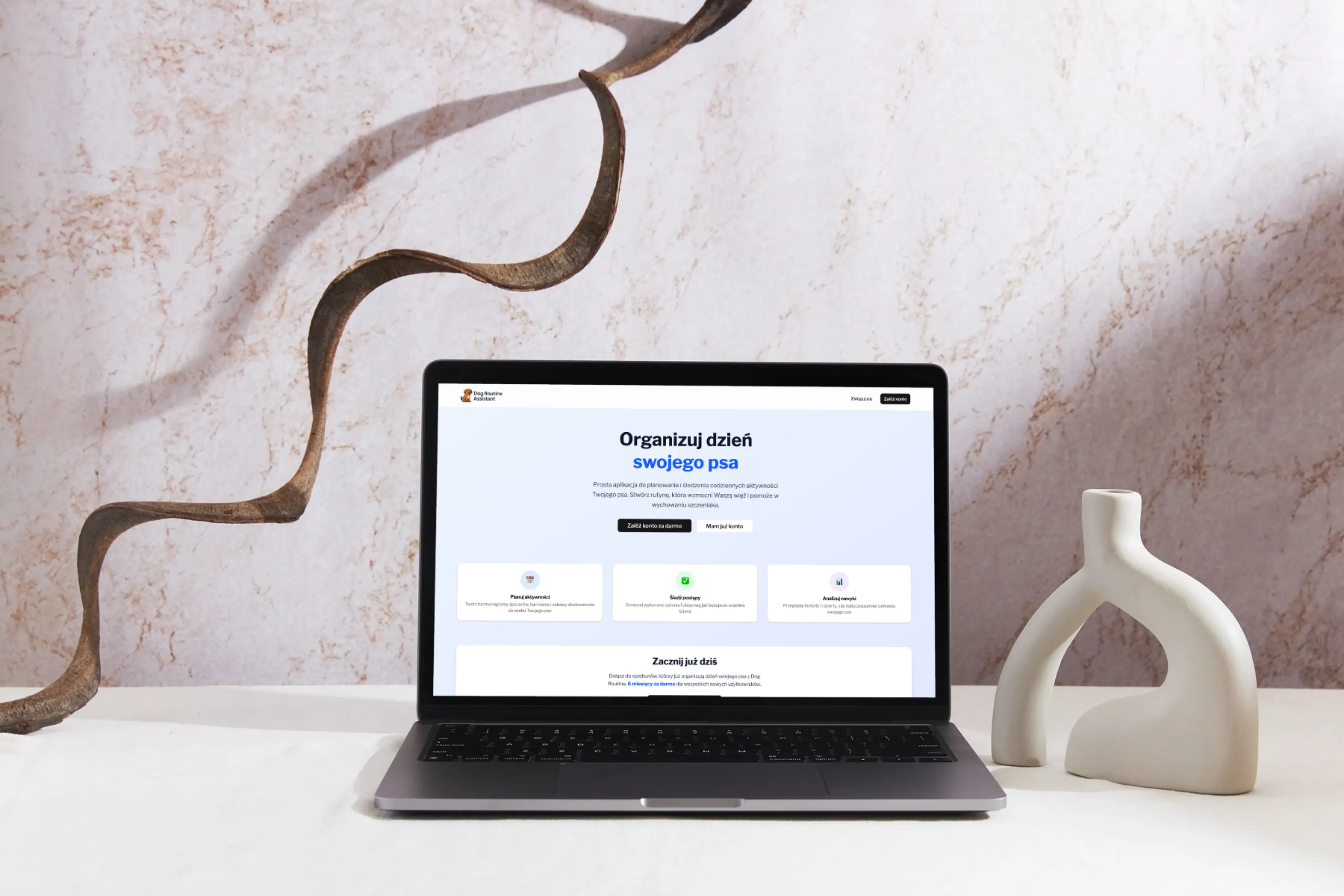
A Fullstack Project Case Study - Dog Routine Assistant
| Project Details | |
|---|---|
| Author | Agnieszka Wojtas |
| Tech Stack | Next.js 15 · Supabase · TypeScript · Tailwind CSS |
| Timeline | ~2 weeks, solo delivery |
| Live | Link |
1. The Real Question
Can a frontend developer with zero backend experience build a production-ready fullstack web app - alone, in two weeks?
That's what this case study is about. Dog Routine Assistant is a web app for dog owners built solo - from database schema to CI/CD pipeline - by a developer whose background was exclusively in React and Next.js. The backend, SQL migrations, Row Level Security, and recurring-schedule logic were all new territory.
The answer is yes - but not because AI writes code for you. It works because AI, used correctly, becomes a thinking partner that helps you ask better questions, catch blind spots, and stay architecturally coherent across an unfamiliar stack.
The core insight
The developers who get the most out of AI combine two skills: they know how to write precise prompts - and they know how to evaluate what AI produces. Neither one is enough without the other.
2. The Problem Worth Solving
New dog owners - especially puppy owners - are overwhelmed. They have a lot of responsibilities to juggle: walks, feeding, play, grooming. But there is no simple, focused tool to help them build and track a daily routine.
Existing apps are either too complex, designed for professional trainers, or not adapted to the Polish market. The gap: a minimalist, mobile-first app that makes it easy to plan, execute, and reflect on a dog's daily schedule.
Primary User
- New dog or puppy owners in Poland
- Digitally active, comfortable with apps
- Overwhelmed by the volume of new responsibilities, looking for simple daily structure
- Discouraged by overly complex tools
What they need
- Quick activity logging
- Recurring schedule templates
- Simple weekly consistency report
- One clear view of "today"
3. What Was Built
Dog Routine Assistant is a full-stack web application. The database consists of 7 tables and 10 SQL migrations versioned in Git.
Core Features
Routine Management
- Today dashboard with % daily progress
- Mark activities: Done / Skipped / Planned
- Recurring templates (RRULE standard)
- Quick add for unplanned activities
- Dog profile with auto age calculation
Analytics
- Weekly consistency chart (Mon–Sun)
- Activity history with filters
- Calendar view
- Percentage consistency score
- Weekly report summary
Application Screens
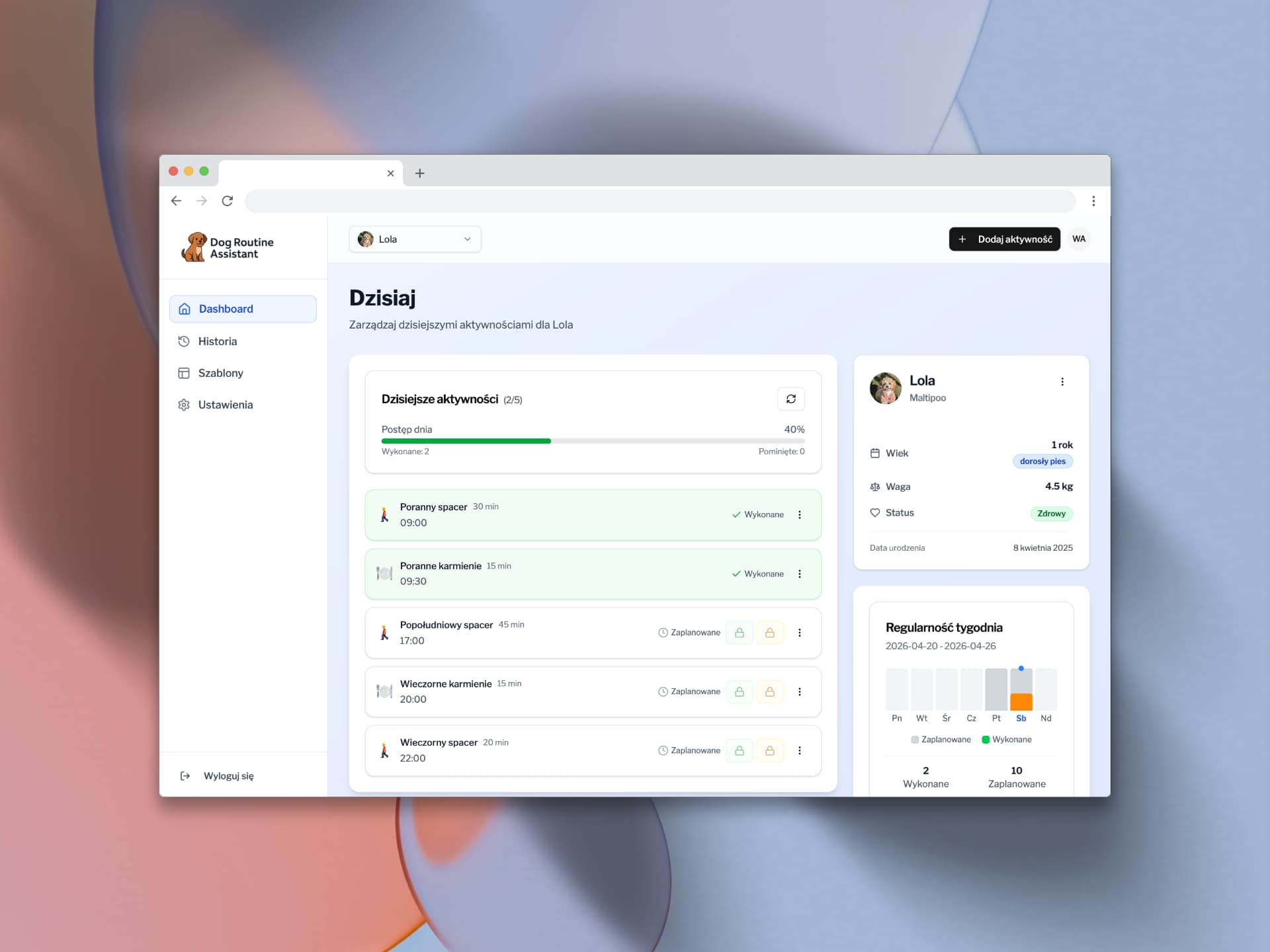
Dashboard - daily activity view with progress bar, dog profile card, and weekly consistency chart. Completed activities highlighted in green; planned ones listed below with one-click status update.
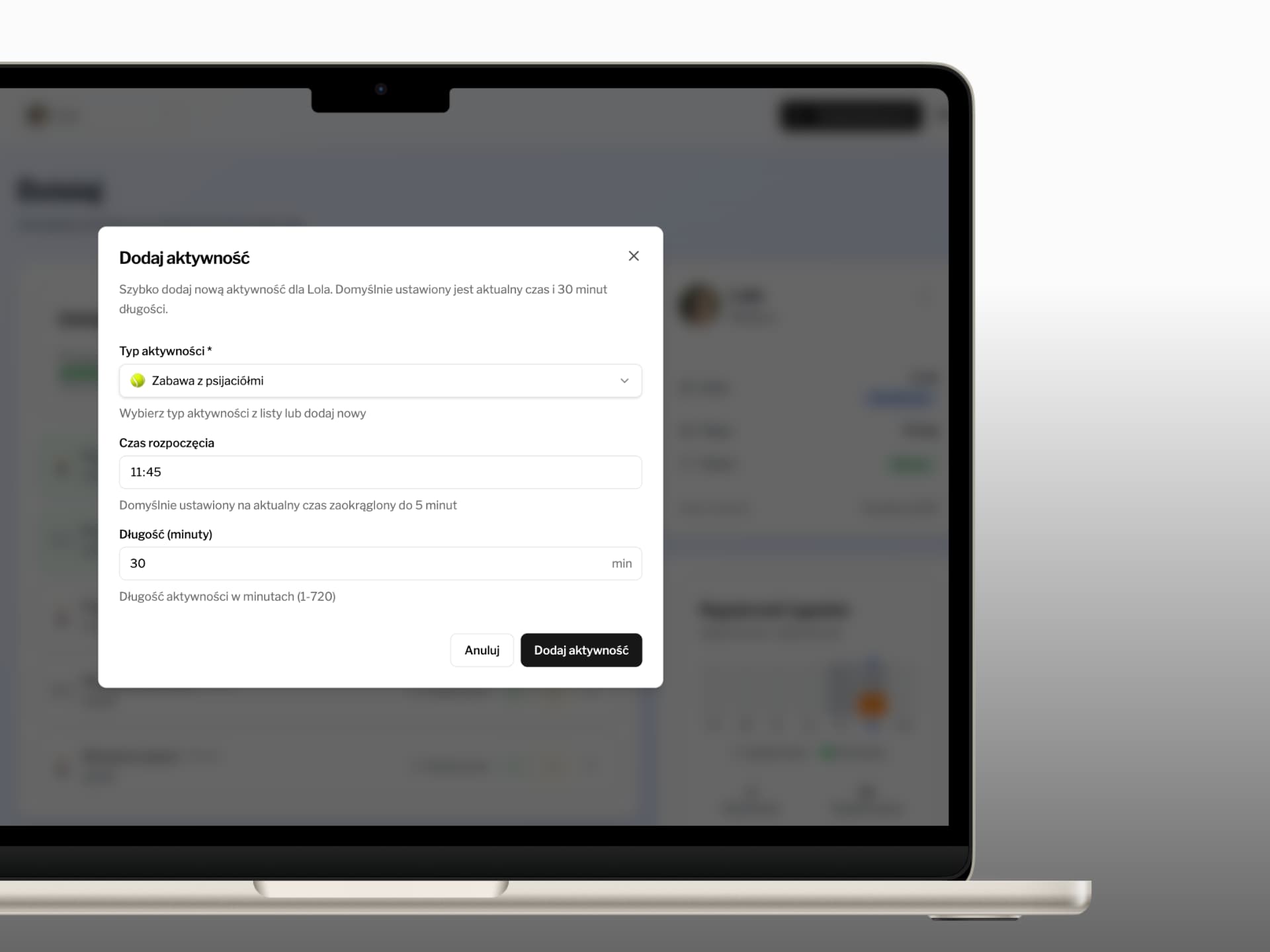
Quick-add activity modal - defaults to current time and 30-minute duration. Activity type selected from a list of system categories or defined as custom.
Technical Architecture
Every technology choice was made and documented before a single line of code was written.
| Layer | Technology | Ver. | Why this choice |
|---|---|---|---|
| Frontend | Next.js (App Router) | 15.3 | Server Components reduce client JS; Route Handlers replace separate API |
| UI / Logic | React + TypeScript | 19/5 | Types give AI context; TS catches errors before runtime |
| Components | shadcn/ui + Radix UI | - | Accessibility built-in; full code ownership |
| Styling | Tailwind CSS | 4 | Utility-first; fast prototyping; consistent with shadcn/ui |
| Backend / DB | Supabase (PostgreSQL) | - | Auth + DB + RLS in one package; no custom server needed |
| Hosting / CD | Vercel + GitHub Actions | - | Auto-deploy on push; preview envs per PR |
| E2E tests | Playwright | - | Multi-browser; built-in waiting; session recording |
| A11y tests | axe-core | - | Automated WCAG audits integrated into Playwright |
Project Structure - Documentation First
Every major component had a written plan before implementation. The .ai/ folder in the repository contains:
.ai/prd.md              - Product Requirements Document (before any code)
.ai/tech-stack.md       - Technology analysis and justification
.cursor/rules/          - AI rules file: project conventions for Cursor
supabase/migrations/    - SQL migration history, versioned in Git
e2e/                    - Playwright end-to-end test scenarios
src/app/api/v1/         - Next.js Route Handlers (REST API layer)
src/components/         - React components with shadcn/ui
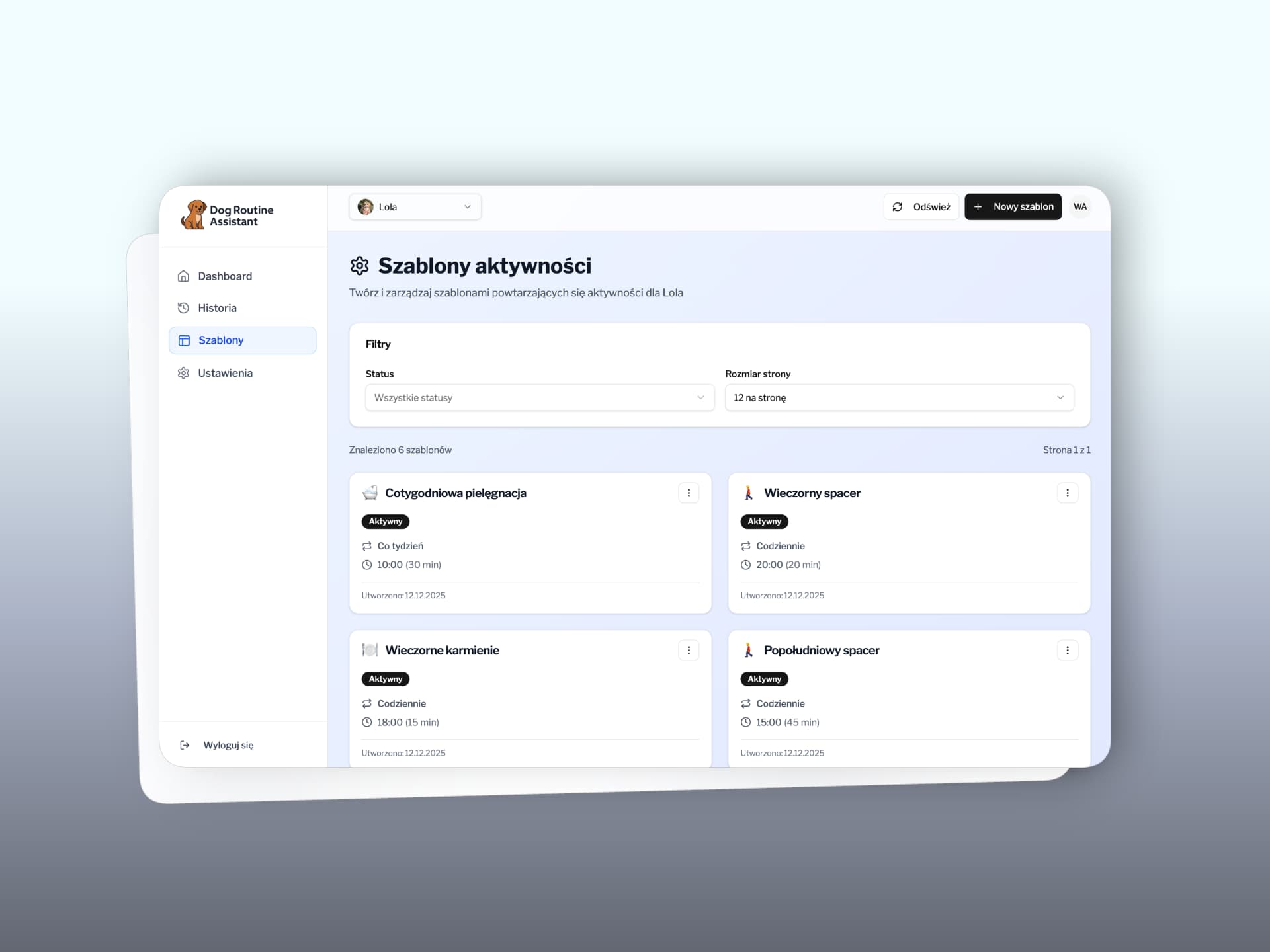
Activity templates page - 6 RRULE-based templates (daily / weekly) with "Active" status badges. Each card displays the scheduled time and duration. Templates automatically generate activities in the daily dashboard.
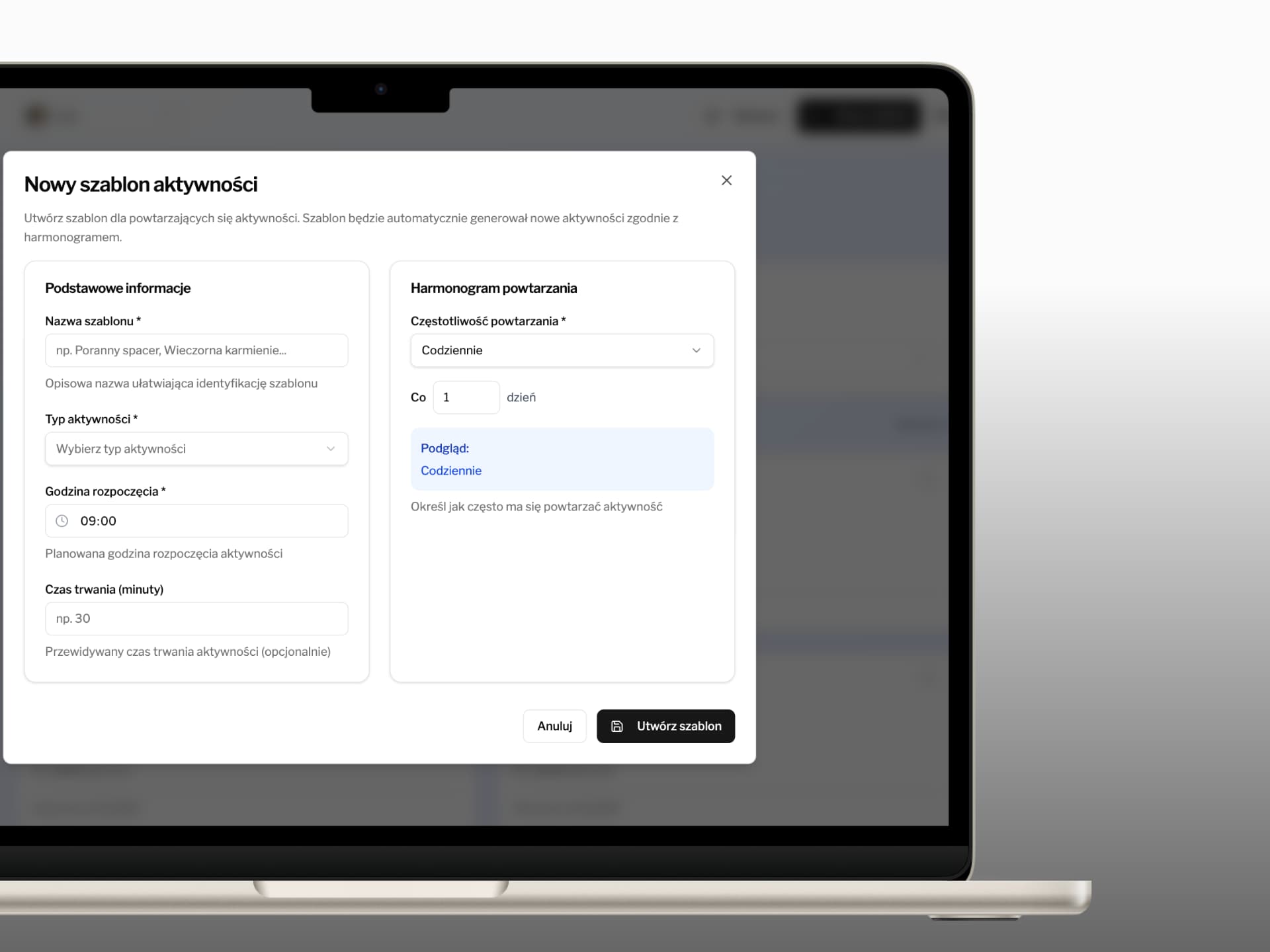
New template modal - two sections: basic information (name, activity type, start time, duration) and a recurrence schedule based on the RRULE standard (daily, weekly, etc.) with a real-time rule preview.
4. Scope & Product Decisions
A good case study is honest about scope. Not everything in the PRD made it into this MVP - and that was a deliberate product decision, not a gap.
Why this is a product decision, not a shortcoming
The Premium plan UI is already implemented - users can see what they will get when they upgrade. The paywall logic itself is out of scope for MVP. This is a classic "validate first, monetize later" approach: prove that users build and follow a routine before investing in billing infrastructure. Building Stripe integration before knowing whether users retain is a common product mistake. The architecture is already in place - adding the gate is a matter of one feature, not rebuilding the whole system.
| Delivered in this MVP | Deliberately out of scope |
|---|---|
| ✅ Authentication (register / login) | ❌ Premium feature gating (payments / Stripe) |
| ✅ Dog profile management | ❌ PDF export of reports |
| ✅ Daily dashboard with progress tracking | ❌ Multi-dog support (premium feature) |
| ✅ Recurring activity templates (RRULE) | ❌ Push / browser notifications |
| ✅ Activity history, calendar view, weekly report | ❌ Social features (sharing routines) |
| ✅ Row Level Security - data isolation per user | ❌ Internationalization beyond Polish |
| ✅ CI/CD pipeline, E2E tests | ❌ Full offline mode |
| ✅ Premium plan UI - visible to user, not yet gated |
5. Where AI Ends and the Developer Begins
The most important thing to understand about this project is what AI did not do. It did not design the architecture. It did not define what the app should be. It did not decide what was worth building. Those decisions were entirely human.
What AI did: dramatically compressed the time between "I need to understand this concept" and "I have working code that I understand." That is the real leverage.
Two Approaches - Vibe Coding vs. Spec-Driven Development
Vibe Coding (what most people do)
"Generate me a fullstack app with authentication and a dashboard." AI produces code. Developer copies it. Three days later, something breaks and nobody knows why - because nobody understood what was built.
Spec-Driven Development (this project)
Write the PRD first. Plan the DB schema. Define the API. Sketch the UI architecture. Then ask AI to help implement each piece - with full context, in small steps, with checkpoints for review.
The Four Phases
Phase 1 - Planning Before Code
A full PRD was written before any code. It included user stories, KPIs, and a defined MVP scope. Followed by a DB schema plan, API plan, and UI architecture doc - all in the .ai/ folder of the repository.
AI's role here: a Socratic sparring partner. Instead of "tell me what to build," prompts were: "Before you begin, ask me 10 questions that will help you understand my context and requirements." This consistently surfaced blind spots - timezone handling for recurring events - before they became bugs.
Phase 2 - Backend: New Territory
SQL migrations, Row Level Security, and RRULE-based recurring schedules - almost all of it completely new. AI helped explain the logic behind each RLS policy, not just generate code. When generated code had timezone bugs, the debugging process was iterative and educational.
The file MIGRATION_CONSOLIDATION.md in the repository documents the hardest part of this phase: learning that every schema change is a new migration file, not an edit to an existing one.
Phase 3 - Cursor Rules: Giving AI Project Memory
One of the highest-ROI practices: writing a rules (here .cursor/rules) file that gives the AI model standing instructions for the project. Without rules, every session starts from scratch. With rules, the AI knows the stack, the conventions, and the constraints from the very first token.
# Excerpt from .cursor/rules
Always prefer Server Components unless useState or useEffect is needed.
Forms: use react-hook-form + Zod for validation.
File names: kebab-case. Components: PascalCase.
Never store project secrets on the client side.
Phase 4 - Tests and CI/CD
Test configuration was done with AI assistance. Test scenarios were written manually - because defining what the app should do requires understanding the product, not just the syntax. Playwright for E2E, GitHub Actions for automatic deploy on every push to main.
The Concrete Techniques
1. The Socratic Method - Questions Before Implementation
Instead of immediately asking for code, ask AI to identify gaps first:
I want to implement recurring activity scheduling based on the RRULE standard.
Before you begin, ask me 10 questions that will help you understand my context, edge cases, and requirements.
Half of those questions consistently revealed something that would have become a bug or a significant refactor.
Cost: a few minutes. Saving: hours of debugging.
2. The 3x3 Workflow - Controlled Iteration
<implementation_approach>
  Implement a maximum of 3 steps. Summarise what you have done.
  Describe the plan for the next 3 steps.
  Stop and wait for my feedback before continuing.
</implementation_approach>
3. The Reset Protocol - When a Conversation Gets Stuck
Stop. Give me an objective summary of this conversation:
- What is working and should be kept
- Where our approach failed, and why
- What we have learned
- A clean problem description for a fresh conversation
The Rule of Three: If the third fix introduces a new problem, reset the conversation. Continuing that session is a trap - you're staying with it because you've already invested time, not because you're heading in the right direction.
4. XML Tags - Structure in Complex Prompts
<project_context>
  Stack: Next.js 15, Supabase, TypeScript; Stage: API endpoint
</project_context>
<task>Implement the create-activity endpoint with Zod validation</task>
<constraints>
  Use existing types from src/types.ts
  Do not modify the database schema
</constraints>
6. Results
| ~2 weeks | 100% | €0 | Live |
|---|---|---|---|
| solo delivery | frontend + backend | infrastructure cost (MVP) | production on Vercel |
Database: 7 tables, 10 SQL migrations versioned in Git. E2E tests: 8 critical scenarios (auth, dashboard, activities, history, templates, onboarding, settings, password recovery) using the Page Object Model architecture - 26 page objects ensuring readability and reusability.
Technical
- Live production app (Vercel)
- Full authentication (Supabase Auth + JWT)
- Row Level Security on all tables
- Playwright E2E - 8 scenarios, 26 page objects
- GitHub Actions CI/CD pipeline
- axe-core accessibility audits
- 10 SQL migrations versioned in Git
- Full docs: PRD, DB plan, API plan, UI plan
Product
- Dashboard with daily % progress
- RRULE-based activity templates
- Activity history + calendar view
- Weekly consistency chart (Mon–Sun)
- Dog profile with auto age calculation
- Weekly consistency score
- Public landing page
- Fully responsive (mobile-first)
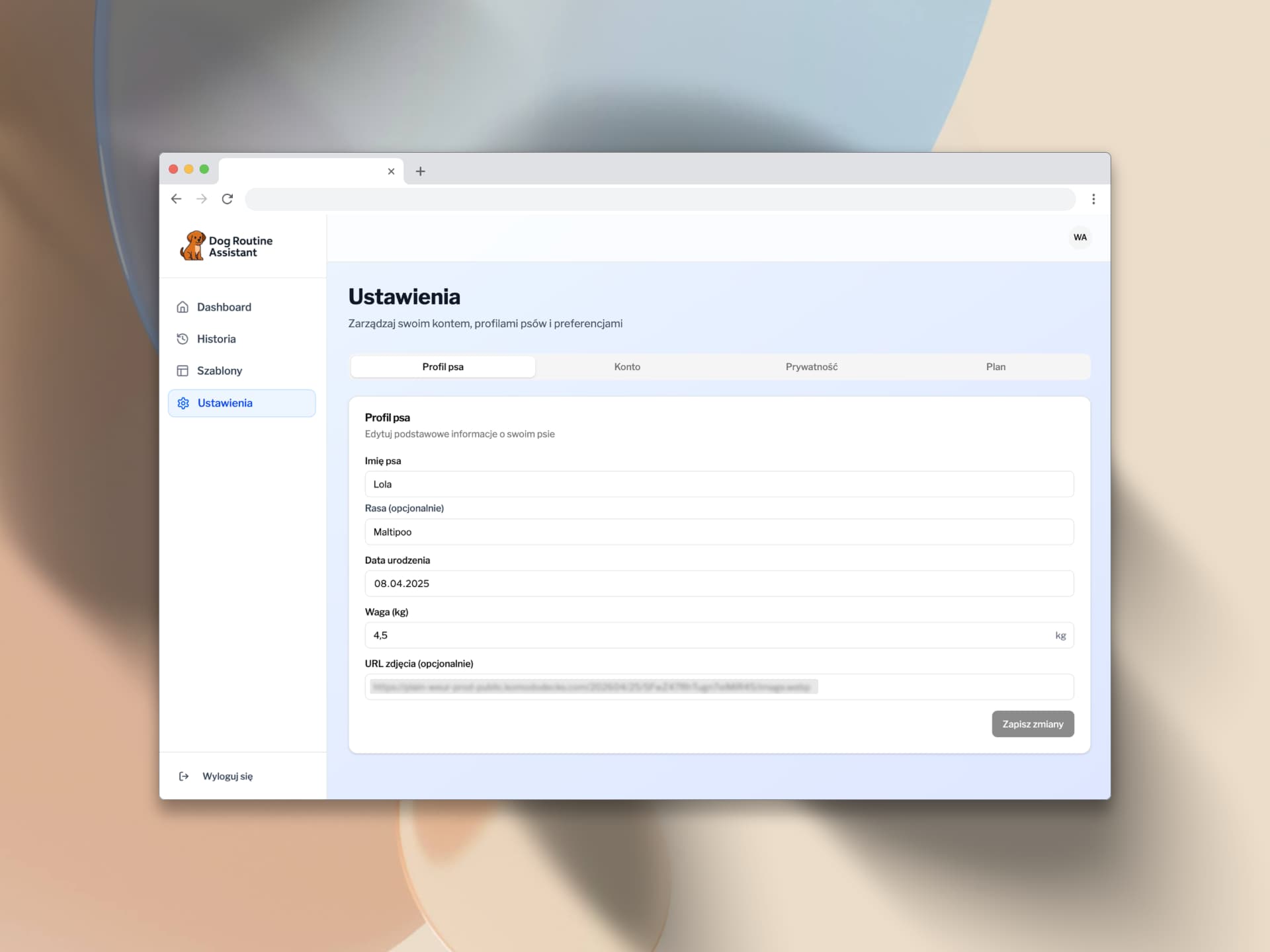
Settings - dog profile tab with editable fields (name, breed, date of birth, weight, photo URL) and a save button. Four tabs: Dog Profile, Account, Privacy, Plan.
7. Challenges and How They Were Solved
| Challenge | What made it hard | How it was solved |
|---|---|---|
| SQL migrations | Every schema change = new file; conflicts on local DB reset | Iterative debugging with AI; MIGRATION_CONSOLIDATION.md as a learning log |
| Row Level Security | RLS policies hard to test locally; wrong policy = silent data loss | AI explained logic per policy; tested with multiple Supabase users |
| RRULE + timezones | rrule + UTC + local time = subtle bug source | Split into smaller functions; tests per edge case |
| Server vs Client Components | RSC/CC boundary not obvious; hydration errors | Cursor Rules defining when to use use client; learned through errors |
| Long AI sessions | Sessions losing context produced contradictory code | Conversation reset protocol; shorter, focused sessions |
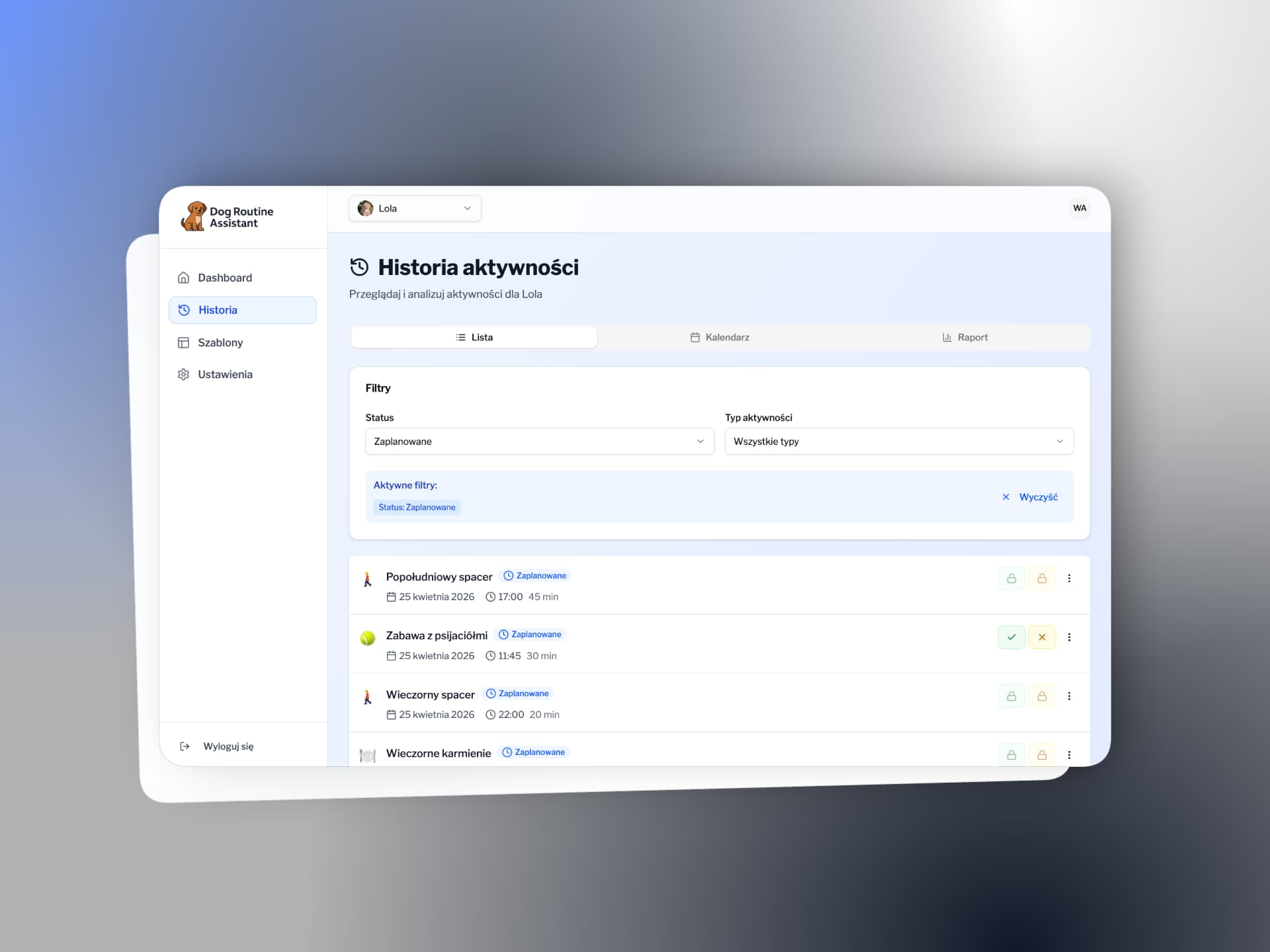
Activity history - list view with filters by status and activity type. Active filters displayed as tags with quick-clear option. Three view tabs: List, Calendar, Report.
The Hardest Moment
The hardest moment wasn't any single bug - it was the first collision with database migration logic. As a frontend developer, I was used to editing a file and saving changes. In SQL, every schema change is a new migration file, versioned in Git, irreversible in production. When I first reset my local database and lost hours of work, I understood why backend developers talk about "migration discipline." AI helped me understand the concept - but the lesson couldn't be skipped. It had to be lived through.
The Most Important Mindset Shift
When AI produces wrong code, the instinct is to blame the model. The more productive frame: the prompt was incomplete, or the problem was too large for one session. Changing the question from "why is AI wrong?" to "what context was missing?" dramatically improves results.
8. Lessons Learned
What worked better than expected?
- Supabase cut the barrier to backend dramatically. Without it, this project would have taken 3× longer.
- Cursor Rules act as project memory - AI retains architectural decisions across sessions.
- Planning before coding: writing the PRD and DB plan first reduced refactoring by at least 50%.
- TypeScript + AI: types give AI context; AI helps maintain and extend types consistently.
- axe-core + Playwright: accessibility testing for free - automated audits with zero added effort.
What I would do differently?
- More unit tests earlier - especially for RRULE logic.
- Atomic commits from day one - small, frequent, descriptive.
- Faster conversation resets. Too much time spent trying to save stuck AI sessions.
- ADR documents (Architecture Decision Records) from day one, not retrospectively.
9. AI-Powered Frontend Engineer
When I started this project, I genuinely wasn't sure I could pull it off. Backend was a bit of a black box to me - RLS, SQL migrations, RRULE scheduling. I knew AI could help, but I didn't know if that would be enough.
Two weeks later, I have a live production app. Not because AI built it for me - but because I learned to ask it the right questions, evaluate what it produces, and know when to start over.
Working effectively with AI is a skill that can be deliberately built - and one I intend to keep developing. I see it as a genuine edge: a differentiator today, a baseline expectation in a few years. I want to be among those who build this competence now - and help other teams do the same.